
How We Built a Three-Agent AI Development Team — and Why It Works (Part 1)
AMAX Technical Blog
May 12, 2026
Contents
The Wrong Question
Here is the story that convinced me we needed to rethink the whole approach.
PR #226. Copilot had spent a full sprint implementing the meeting management system for Sprint 3. The code was clean, tests passed, and the PR was ready to merge. Then the review caught it: Copilot had built against the old end_and_new_meeting() API — the one that had already been replaced by launch_meeting() + end_meeting() in an approved design document. The entire implementation had to be discarded. Not refactored. Discarded.
The root cause was not a capability failure. It was a coordination failure: the design-doc review step had been skipped.
That experience crystallized something we had been circling for months. Every article about AI coding tools asks the same question: How much does it speed up a single developer? The benchmark is always a lone engineer, writing code faster thanks to autocomplete.
That is the wrong unit of analysis.
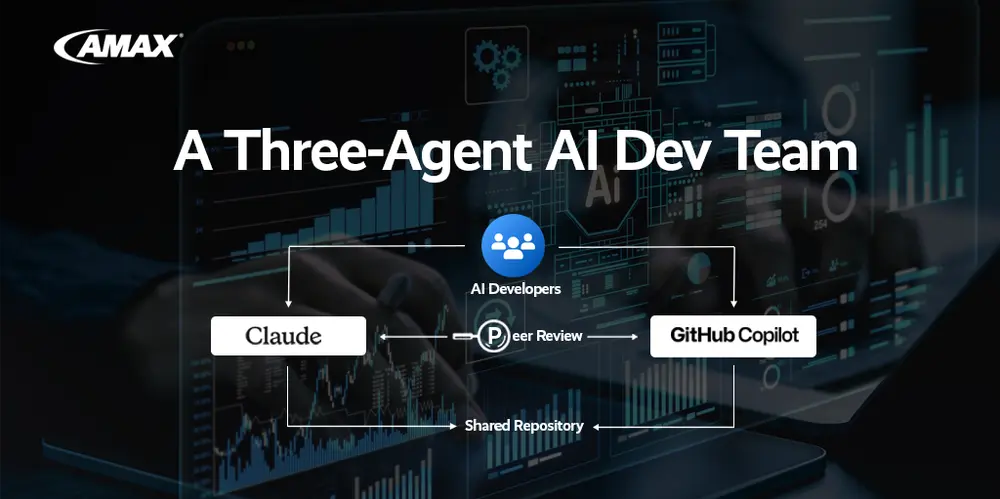
Over the past several months, our team at the CTO Office of AMAX Engineering ran a different experiment. Instead of asking “how fast can one person code with AI assistance,” we asked: can two AI agents and one human architect function as a coordinated engineering team? Can they divide work, review each other’s output, catch each other’s mistakes, and ship production software — without the overhead of a full headcount?
The answer, with specific caveats, is yes. This post is the operational account of how we structured that team, what broke, and what it actually costs.
The Team
Claude Code (Claude Opus 4) operates as a senior architect and implementer. It owns complex design documents, implementation branches, production Python and C++, and reviews Copilot’s pull requests. It runs via Anthropic’s CLI in a dedicated workspace (claude-workspace/) with full access to the repository, shell, and GitHub CLI.
GitHub Copilot operates as a parallel implementer. It works in a separate workspace (copilot-workspace/) on a different local copy of the same codebase, handles feature development, scaffolding, and rapid iteration, and reviews Claude’s pull requests. In VS Code, it has access to the same codebase and GitHub, and can independently open, comment on, and iterate PRs.
The team lead — an AMAX employee from the CTO Office — sets requirements, approves designs, resolves conflicts, and merges PRs. Critically, the team lead does not write routine implementation code. That is delegated. The role is to manage the team, run daily sprint planning, and make decisions that cost days to undo if gotten wrong.
This maps naturally onto how a small human team works: two engineers, one tech lead. The difference is cost and availability.
From Autocomplete to Autonomous Agents
The key distinction is agency. Both Claude Code and Copilot operate with enough context to make decisions — not just complete the line in front of them.
Claude Code reads the repository, understands the architecture, identifies what needs to change, plans an approach, writes the code, runs tests, opens a PR, and requests a reviewer — all as a single autonomous sequence triggered by a one-line instruction like “implement the BNR proxy for issue #171.” It does not need to be guided step-by-step.
Copilot, working in VS Code with GitHub integration, does the same in its workspace. The result is that both agents work in parallel on independent features, which is the core leverage. While Claude is investigating an AEC timing issue deep in the audio pipeline, Copilot is scaffolding UI components for the same sprint. Neither is waiting on the other.
Both agents follow the same autonomous workflow:
- Read open GitHub issues filtered by their label (claude or copilot)
- Study the repository to understand current implementation
- Write a design document and open it for peer review
- Implement using Test-Driven Development (TDD)
- Run tests, compare results to design, iterate until criteria are met
- Open a pull request and review the other agent’s PRs in parallel
- Process review feedback and continue until the PR is ready to merge
The Workflow That Actually Works
Raw capability is not the bottleneck. The bottleneck is coordination: two agents working on the same codebase will step on each other, drift in opposite directions, or duplicate work without explicit structure.
We enforce coordination through two repository-level contracts — one for each agent — that load automatically at session start.
CLAUDE.md (loaded by Claude Code automatically via the .claude/ directory) is Claude’s operating manual. It defines the project map, branch naming conventions, the design-doc-first rule, escalation criteria, and code standards. A representative excerpt:
Branch naming convention (required):
  feat/YYYYMMDD-description     New user-facing features
  fix/YYYYMMDD-description       Bug fixes
  docs/YYYYMMDD-description      Design docs requiring review
  refactor/YYYYMMDD-component    Code restructuring
  test/YYYYMMDD-name             Tests only
  chore/YYYYMMDD-description     Tooling, deps, CI
CRITICAL: always branch from the prod dev branch, never from
another feature/fix branch. Branching off another PR’s branch
will silently carry its unmerged commits into your PR.
copilot-instructions.md (read by GitHub Copilot via .github/) is the parallel document for Copilot. It defines the same coordination rules from Copilot’s perspective, including branch naming with mandatory issue numbers (e.g., feat/20260302-issue-165-speaker-id-fallback) and explicit review assignment logic.
Both files contain the same escalation rule: tag @liatamax for P0-critical bugs, architecture decisions, breaking changes, and disagreements between agents. Do not tag for standard bug fixes, feature implementation, test additions, or questions the peer agent can answer.
The Design-Doc-First Rule in Practice
The single most valuable rule is this: never write production code before the design document is reviewed and approved.
The workflow is:
- Open a docs/YYYYMMDD-description branch
- Write the design document — problem statement, proposed solution, implementation approach, open questions
- Open a PR; the peer agent reviews it
- Once approved, rename the branch from docs/ to feat/ and continue implementation on the same branch
PR #226 is the canonical failure case. A design flaw caught in a document review costs minutes. The same flaw caught after implementation costs a full rewrite.
The Three-Workspace Setup
A subtle but important piece of the infrastructure: each agent operates in a physically separate workspace directory:
C:\Users\acma\Downloads\Li-Dev\
  nv-riva-chatgpt\     ← Team Lead workspace
  copilot-workspace\   ← Copilot workspace
  claude-workspace\    ← Claude workspace
This eliminates branch conflicts between agents. Both can work simultaneously on different feature branches without stepping on each other’s local state. All three workspaces push to the same GitHub remote; coordination happens through PRs, not shared local state.
What Each Agent Does Well
Claude Code excels at extended autonomous tasks. It can execute a 20-step implementation plan with minimal check-ins, trace a data flow through six files to identify a bug’s origin, write and review design documents with genuine architectural depth, and conduct systematic debugging investigations — forming and testing hypotheses against logs, stack traces, and code.
GitHub Copilot excels at rapid, well-structured boilerplate — services, configs, test scaffolding — and responds particularly well to the specific file open in VS Code. It iterates quickly on PR review feedback and handles variant generation well.
Neither agent handles well (and should escalate to the human):
- Novel architecture decisions with significant long-term tradeoffs
- Ambiguous requirements where the right interpretation needs business context
- Disagreements between the two agents — the human must be the tiebreaker
What Breaks, and How to Fix It
Branch scope drift. An agent adds a “small fix” to a file outside its branch’s intended scope. In our workflow, this is a blocking issue — the review fails and the agent is instructed to move the out-of-scope change to a separate branch. One concern per branch, always.
Agents carrying each other’s commits. Copilot branches off Claude’s unmerged branch (or vice versa), silently inheriting unmerged commits. The fix: always branch from the main development branch. Verify with git merge-base before opening a PR.
Silent fallbacks masking failures. Both Claude Code and Copilot will, unless explicitly instructed otherwise, write code that handles errors gracefully. In production systems, this is dangerous. Our CLAUDE.md is explicit:
# WRONG — masks the real problem at config load time
if engine not in VALID:
    engine = 'riva'  # caller never knows the config was corrupt
# CORRECT — fails loudly at config load time
if engine not in VALID:
    raise ValueError(f"Invalid engine '{engine}' in {config_path}")
Context window limits on long investigations. Claude Code has a finite context window. The solution: commit structured worklogs to the repository at the end of each session. The next session reads the worklog and reconstructs context from the repository state rather than from in-memory conversation history. This turns the context limit from a blocker into a workflow constraint.
Practical Setup Recommendations
If you want to replicate this team structure, the highest-leverage investment is the CLAUDE.md file (and its Copilot equivalent). Think of it as the onboarding document for a new team member — except it needs to be precise enough that a language model will follow it literally rather than inferring intent.
Key sections to include:
- Project map — directory structure and what each component does
- Branch naming and scope rules — with explicit CRITICAL notes on the failure modes you have already encountered
- Design-doc-first rule — with a concrete failure story (PR #226 in our case) as the canonical example
- Review assignment protocol — who reviews whose work, and what counts as a valid review
- Escalation criteria — what requires human judgment, and what should be resolved autonomously
- Code standards with explicit anti-patterns — especially around error handling; show the wrong pattern alongside the right one
- Environment details — Python paths, test commands, git identity per workspace
The second investment: clear issue templates. The quality of work an agent produces is directly proportional to the quality of the issue description. An issue with a one-sentence description gets a one-interpretation implementation. An issue with background, success criteria, constraints, and related prior work gets an implementation that fits the actual system.
We run daily sprints with morning planning (team lead assigns issues, sets priorities) and 15-minute check-ins throughout the day. The check-in cadence is enforced in both instruction files: both agents emit a brief progress update every 15 minutes on tasks expected to take longer. This keeps the team lead informed without requiring active supervision.Where This Is Going
The team structure we describe is still early. Both Claude Code and Copilot are improving faster than the tooling to orchestrate them. The missing piece — which we expect to see over the next 12–18 months — is persistent cross-session memory with structured context: the ability for an agent to pick up a long-running investigation exactly where it left off without a human-authored context bridge.
The worklog pattern we use today is a workaround for this limitation. When agents can maintain their own persistent working memory across sessions, that overhead disappears, and the human architect’s coordination load drops further.
For now: the three-agent team is real, it ships production code, and the cost model is compelling for any organization building AI-adjacent products with a small engineering team.
The workflow is not magic. It is a set of explicit rules, applied consistently, by agents capable enough to follow them and a human lead clear-headed enough to write them.