


Building Secure Real-Time Speech AI
Real-time speech applications have moved from early experimentation into practical tools used across enterprise teams. Sales workflows depend on accurate meeting transcripts, contact centers rely on live agent assistance, and globally distributed organizations need multilingual communication that protects internal data. As interest grows, many teams run into a common issue. Most commercial speech services operate only in the cloud, which limits control over data flow, latency, and infrastructure behavior.
NVIDIA Riva offers another path. Riva is a GPU-accelerated speech software development kit (SDK) that can run in on-prem environments or at the edge, giving organizations the option to keep speech workloads inside their own infrastructure. It supports streaming automatic speech recognition (ASR), text-to-speech (TTS), and neural machine translation (NMT). For teams that prefer to manage voice AI pipelines within their internal environment, Riva provides a way to deploy high-performance speech applications with predictable behavior and full control over the system.
The SDK includes capabilities that stand out in enterprise scenarios. These include native streaming support, vocabulary and pronunciation customization, and advanced components such as voice activity detection and speaker diarization. These options support use cases where predictable latency, domain-specific terminology, or structured conversational output matter.
Riva ASR Profiles with Silero VAD and Sortformer Diarizer
Below is a reference table of English ASR profiles that use Silero VAD and the Sortformer diarizer.
| Profile (NIM_TAGS_SELECTOR) | Inference mode | GPU memory (GB) |
|---|---|---|
| name=parakeet-1-1b-ctc-en-us,mode=ofl,vad=silero,diarizer=sortformer | offline | 11.90 |
| name=parakeet-1-1b-ctc-en-us,mode=str,vad=silero,diarizer=sortformer | streaming | 6.32 |
| name=parakeet-1-1b-ctc-en-us,mode=str-thr,vad=silero,diarizer=sortformer | streaming throughput | 6.96 |
| name=parakeet-1-1b-ctc-en-us,mode=all,vad=silero,diarizer=sortformer | all | 22.4 |
AMAX engineers have been testing Riva in a dedicated development workflow to build a practical real-time transcription pipeline. The goal is to show how GPU accelerated speech systems can be deployed, tuned, and validated in an enterprise lab. The work spans multiple development environments, several prototype iterations, and the lessons learned while assembling a complete voice AI workflow.
Riva Streaming Architecture
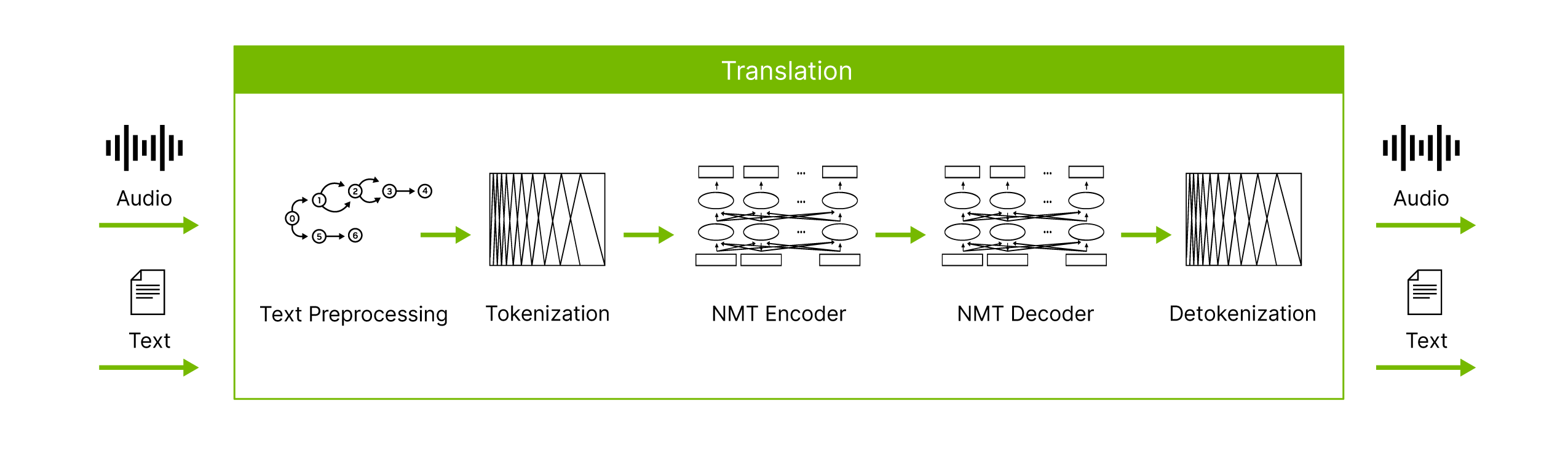
This project focused on building a full on-prem voice AI workflow using NVIDIA Riva. The objective was to capture audio reliably, stream it to Riva, and produce low-latency transcripts that can support meeting tools and internal productivity applications. Achieving this required implementing the complete signal path, including device-level audio capture, consistent 16 kHz PCM audio streaming (Pulse Code Modulation), bi-directional gRPC communication (Remote Procedure Calls), and handling both interim and final transcripts as they arrive in real time.
Riva’s streaming model is based on a persistent gRPC session between the client and server. The client sends audio in small PCM chunks, and Riva returns recognition outputs as soon as they are computed. These responses may arrive as interim hypotheses or finalized segments. Developers must manage asynchronous messages on both channels while ensuring that the client UI or CLI remains responsive and does not interfere with the continuous audio loop.
From an infrastructure standpoint, Riva runs efficiently on a single GPU and does not require specialized hardware beyond standard enterprise GPU systems. For our prototyping we used a system with NVIDIA RTX PRO™ 6000 Blackwell Server Edition GPUs, however this is not the requirement. When deployed on production servers, the latency and throughput are suitable for multi-user environments. Riva is delivered as a containerized NIM service (NVIDIA Inference Microservice), which allows it to integrate with existing DevOps workflows and to be evaluated without modifying live systems.
To validate real world behavior, the team built several prototypes across different platforms. Work first began with a simple command-line streaming tool on Linux, then expanded into browser-based implementations, and eventually Windows desktop applications capable of capturing system and meeting audio. Each stage provided useful insight into latency characteristics, how interim transcripts behave, device specific constraints, and the challenges of handling audio from conferencing tools.
ASR Protocol Definition
This condensed protobuf outlines the core protocol used for the ASR pipeline. It includes a blocking Recognize RPC for batch audio and a bidirectional StreamingRecognize RPC for real-time speech processing. A client sends an initial RecognitionConfig, then streams audio chunks, and the server returns interim and final transcription results as they are produced. This shortened version removes vendor-specific fields while preserving the sequence required for integrating desktop clients with the AEC plus Riva workflow.
syntax = "proto3";
package nvidia.riva.asr;

import "riva_audio.proto"; // includes AudioEncoding and related types

// ASR service: batch and streaming
service RivaSpeechRecognition {
  rpc Recognize(RecognizeRequest) returns (RecognizeResponse) {}
  rpc StreamingRecognize(stream StreamingRecognizeRequest)
      returns (stream StreamingRecognizeResponse) {}
}

// Batch recognition
message RecognizeRequest {
  RecognitionConfig config = 1;
  bytes audio = 2;
}

message RecognizeResponse {
  repeated SpeechRecognitionResult results = 1;
}

// Streaming recognition
// First message: config
// Following messages: audio bytes
message StreamingRecognizeRequest {
  oneof streaming_request {
    StreamingRecognitionConfig streaming_config = 1;
    bytes audio_content = 2;
  }
}

message StreamingRecognizeResponse {
  repeated StreamingRecognizeResult results = 1;
}

// Key configuration fields
message RecognitionConfig {
  AudioEncoding encoding = 1;
  int32 sample_rate_hertz = 2;
  string language_code = 3;
  // additional fields omitted for readability
}
...
}
...
}
Implementation Journey
Phase 1 - Establishing Development Environments
The team began by setting up development environments across both Linux and Windows to evaluate NVIDIA Riva’s behavior under different conditions. Ubuntu Desktop 22.04 provided a dependable starting point because of its support for Python libraries, gRPC tooling, and NVIDIA’s development ecosystem. Early work focused on confirming microphone capture, adjusting audio chunk sizes, and analyzing how Riva handled continuous streaming in a controlled environment.
To support applications that run on end user devices, the team also built a Windows 11 workflow. Many enterprise environments rely on conferencing tools such as Microsoft Teams and Zoom, which restrict browser access to system audio. SoundDevice and PyAudio work well on Windows 10, but Windows 11 introduced the Windows Audio Session API (WASAPI), requiring PyAudioWPatch for reliable audio capture.
The first functional version of the pipeline was a lightweight Python command-line tool. It captured microphone input at 16 kHz, grouped frames into roughly 100 milliseconds of PCM audio, and streamed them to Riva through gRPC. Riva returned interim and final transcripts in real time, allowing the team to examine latency, update frequency, and transcription behavior.
Below is the configuration used for the Riva ASR service:
# Configure ASR service

self.streaming_config = StreamingRecognitionConfig(
    config=RecognitionConfig(
        language_code="en-US",
        sample_rate_hertz=sample_rate,
        encoding=AudioEncoding.LINEAR_PCM,
        max_alternatives=1,
        enable_automatic_punctuation=True,
    ),
    interim_results=True,
)

if self.speaker_diarization:
    add_speaker_diarization_to_config(
        self.streaming_config,
        diarization_enable=True,
        diarization_max_speakers=4
    )
This first stage confirmed several important behaviors:
- Riva maintains stable streaming performance when audio chunk sizes match model expectations
- Interim results arrive frequently, which requires responsive UI layers that can process rapid updates
- Threading is necessary so audio capture and transcript updates do not block each other
- Python’s gRPC library and the Riva SDK are sufficient for real-time workloads
Even at this early point, the prototype revealed useful insights about latency, client-side timing, and the practical needs of downstream applications.
Phase 2 - Expanding Toward Browser and Desktop Clients
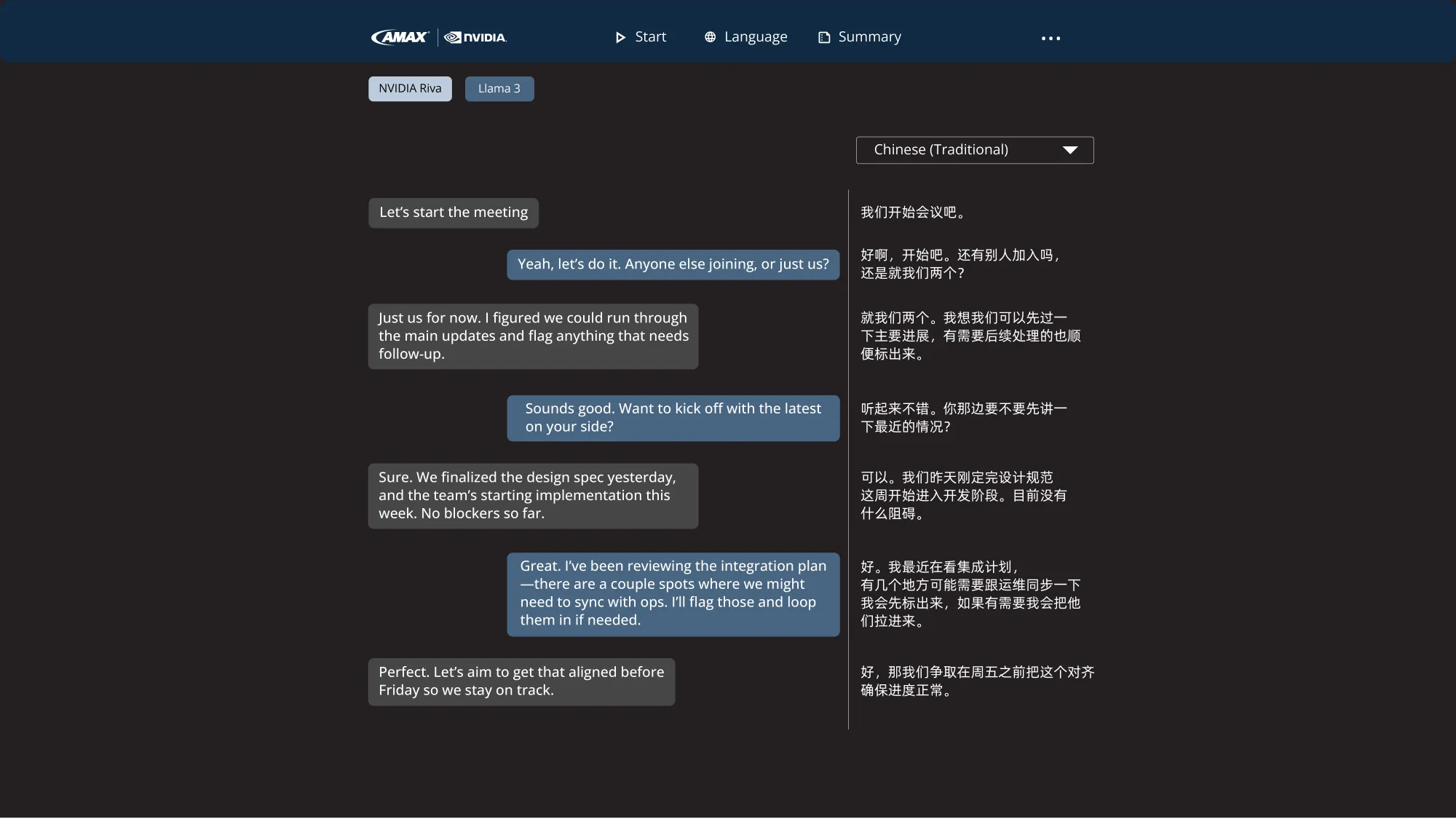
With the command-line prototype working reliably, the next step was to evaluate a browser-based approach. The team created a Flask and JavaScript prototype that captured microphone audio in the browser, converted it into raw PCM, and streamed it over a WebSocket gateway to the Riva backend. This helped evaluate latency, chunk size behavior, and the limitations of browser audio APIs.
Browser testing revealed an immediate constraint. Modern browsers cannot access system audio for security reasons. Since many enterprise workflows involve conferencing tools such as Microsoft Teams or Zoom, the inability to capture system audio meant that browser-only streaming was not a viable long term solution.
This led to a parallel effort to build a native desktop client on Windows using Python. The team tested several UI frameworks, including Tkinter, TTK, CustomTK, and PyQT6. The final choice was PyWebview, which allowed the application to be built with HTML, JavaScript, and CSS while still interacting directly with Python APIs. This provided access to system resources such as loopback audio, enabling tests with both microphone input and meeting audio from real collaboration tools.
Full desktop client development will be covered in a later part of this series, but this phase established the foundation for moving beyond prototypes toward production-oriented user interfaces.
Phase 3 - Beyond Riva… Hello Maxine!
While Riva delivers the core components needed for speech recognition, translation, and text to speech, many real world voice applications benefit from additional audio processing. NVIDIA Maxine™ adds features such as Acoustic Echo Cancellation, Background Noise Removal, and other media focused capabilities that can significantly improve clarity in meeting and collaboration environments.
Maxine supports C++ and runs on both Windows and Linux. As part of this project, the team began experimenting with Maxine to evaluate how its preprocessing tools can work alongside Riva in an on-prem workflow. Early tests focused on building a combined Riva and Maxine application, which will be covered in a future post.
Results and Observations
The engineering work produced several key findings across performance, client behavior, and real world audio handling:
- On-prem Riva deployments provide consistent latency suitable for live meeting transcription.
- Threaded audio ingestion is essential for reliability across both Linux and Windows clients.
- Chunk size selection directly impacts responsiveness. Larger chunks reduce load but increase perceived latency.
- Interim and final transcript handling requires careful processing to avoid overwhelming UI layers.
- Real world client environments introduce constraints that influence the design of cross-platform applications.
One detail worth noting is how Riva structures its responses. Riva produces two types of responses: interim and final, indicated by the is_final flag. Each response is treated as an “utterance,” which may represent a full sentence, multiple sentences, or a partial fragment depending on speaking style.
Riva provides several configuration options to control how utterances are formed, such as --start-history|history-eou|threshold and --stop-history|history-eou|threshold. The team tested these parameters across different speaking patterns to see how they affected output quality. In practice, the default configuration, without adjusting these knobs, performed well in roughly 8 out of 10 scenarios, measured by both the total number of words correctly transcribed and the total number of final utterances returned by Riva.
Based on these observations, the team created a small sentence builder utility that uses Riva’s auto_punctuation feature together with a timeout setting to assemble clean sentence-level text from the stream of final utterances. This step produces structured output that can be sent to downstream components, including translation pipelines or other post ASR processing.
python transcribe_file.py \
  --server 0.0.0.0:50051 \
  --input-file ~/Audio.LOOP.Meeting_20250903_100125.wav \
  --simulate-realtime \
  --start-history 240 --start-threshold 0.33 \
  --stop-history 550 --stop-threshold 0.82 \
  --stop-history-eou 180 --stop-threshold-eou 0.78
Practical Applications for On-Prem Voice AI
The NVIDIA Riva architecture supports several practical enterprise workflows:
- Sales teams that rely on live transcription and post-meeting summaries.
- Contact centers where agents need real-time speech assistance.
- Distributed teams requiring multilingual meeting support.
- Organizations that need to keep sensitive audio inside their own environment.
All of these scenarios benefit from low-latency speech recognition running locally instead of sending audio to third-party cloud services.
AMAX Services for Riva and GPU-Accelerated Systems
Riva includes native support for on-prem deployment through Docker containers and scales through Kubernetes for larger environments. AMAX uses the Riva Speech Skills Helm chart to deploy ASR, NMT, and TTS services automatically, and to streamline push-button deployment into a Kubernetes cluster.
For customer environments, AMAX also tunes and customizes Helm chart configurations to match existing GPU clusters, or designs new accelerated systems when refreshed infrastructure is required.
AMAX engineers build and validate complete AI systems that combine GPU hardware with practical software workflows. The work with Riva follows the same engineering approach: controlled development environments, iterative prototypes, and detailed analysis of real-time behavior. This creates a reliable foundation for voice AI applications that run entirely on customer-owned infrastructure.